

Have you ever played chess and realized that the smartest players don't just move a piece… they set off a chain of strategic possibilities? What if managing enterprise data could work the same way, where one intelligent move reshapes the entire board?
That's exactly the brilliance behind KAI's Multi-Object Change Request (MOCR). It's not just a feature; it's a shift in how we think about data management.
MOCR is a smart, structured process designed to handle real-world enterprise data changes across multiple datasets, at the same time, in one coordinated flow. Instead of chasing one object after another, MOCR lets business users initiate, manage, and track changes involving several records or even entirely different datasets (think maintenance items, functional locations, equipment, and more) all within a single prompt.
How Do We Get Rolling?
Let's assume Mike is an engineer at one of Canada's largest mining companies. To kick things off, he logs into MDO, navigates to the Ask KAI page, and selects Raise a Multi-Object Request.
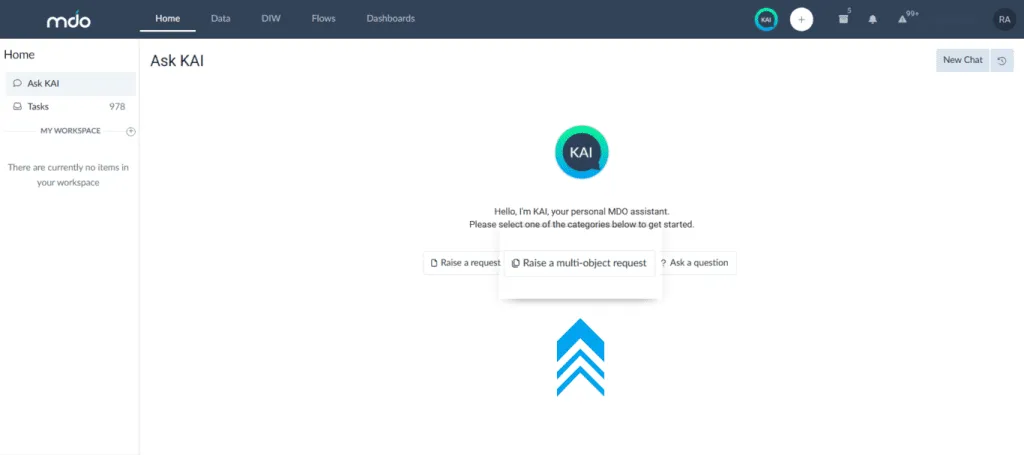
Note: The image is a sample of Raise a Multi-object Request feature within KAI
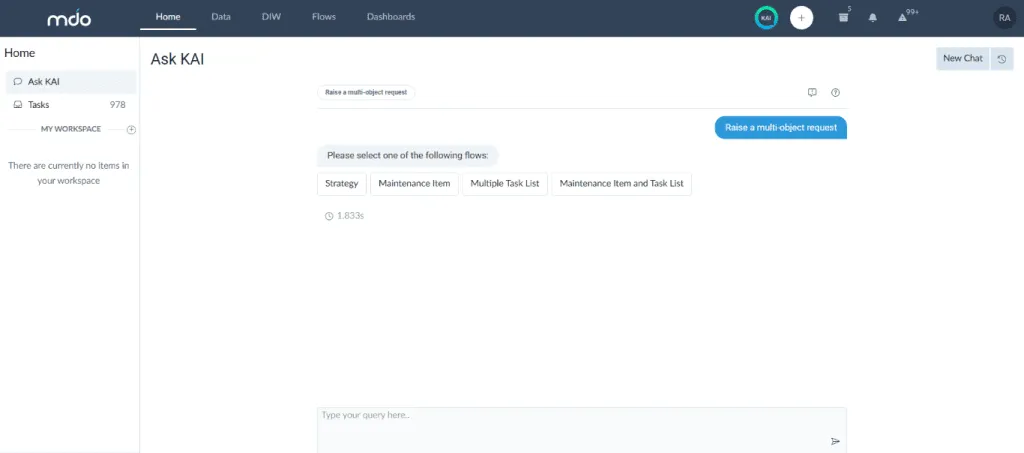
When Mike clicks on ‘Raise a Multi-Object Request,' he gets to choose from among four options that are tailored to his organizational needs. Instead of a rigid, one-size-fits-all set of options, what Mike sees is the result of how the admin user has configured the flows for his organization.
That means the admin decides what business rules to enforce, which forms to display, how the workflow should operate, who the requesters are, and who the approvers will be. Every part of the process is configurable, giving the organization total control.
For Mike, the available flows include Strategy, Maintenance Item, Multiple Task List, and Maintenance Item with Task List. Each option is enabled because the admin user has set it up with specific rules and workflows. Another company, however, might see something entirely different—fewer flows, more flows, or completely different ones—depending on what their processes demand.
Note: The image is a sample of choices available for Mike on clicking Raise a Multi-object Request feature within KAI
So, let's go back to Mike,
He chooses the Maintenance Item with Task List flow, because he needs to update not just one, but two task lists with specific information. Normally, this would mean raising two separate requests, chasing two approval chains, and putting in double the effort.
But with the Multi-Object Change Request feature in KAI, Mike doesn't have to repeat himself. He simply types a single prompt.
Prompt Example:
“Change Task List Group: 10825001, Task List Counter: 01, Task List Description: Mech Repl Side Plates 2, Responsible Planner Groups 006
Also change Task List Group 10801400. Task List Counter: 01. Task List Long Text: Testing long text, Main Work Centre MNO7, Work Centre Plant: CY001”
Note: These are two different tasks that need change but are prompted in one command.
What happens next?
- First, KAI digs into your request and figures out what needs doing—in this case, it spots two separate tasks because you asked to update two different task lists. Nothing gets mixed up; each task list is clearly identified.
- Then, KAI presents the changes in a clear tabular format, breaking tasks down into objects so users can easily see what has been updated. This structured view provides context and makes it simple to understand modifications across task lists and records. The table displays each line item or row individually, clearly identifying the specific tasks that need to be performed.
- Right under that table, you get two options: “Yes” (meaning – the changes made are good to go) and “No” (meaning – need additional tweaks).
- KAI also provides a summary of the actions taken. Users can verify these changes using the View Form option located at the top-right corner of the chat screen.
Pretty neat, right?
But What If You Needed More Than Two Updates?
In the case of related datasets...
- For up to five changes, KAI proceeds to validate each change individually. The validation process includes:
- Data consistency checks
- Referential integrity verification
- Dataset-specific business rule validation
- Cross-dataset dependency checks, where applicable
- For larger volumes, i.e. more than five changes, KAI automatically intervenes. The user is promptly notified that bulk processing is required, with the following message:
- Prompt: “The request contains more than five changes and should be submitted using the MDO Bulk Data Changes tool (XFuse).”
And in the case of unrelated datasets….
- For five or fewer changes, KAI processes the requests as an MOCR, bundling all actions under a unified user session for complete traceability.
- For more than five changes, the user is promptly informed that bulk handling is required, with a prompt.
- Prompt: “The request contains more than five changes and should be submitted using the MDO Bulk Data Changes tool (XFUSE).”
What Makes MOCR Stand Out?
- Unified, hierarchical handling: MOCR works across related datasets, such as Maintenance Plans, Task Lists, Maintenance Items, capturing all dependencies.
- Rule-driven validation: Every update passes strict business rule checks before being submitted.
- Template-driven efficiency: Reusable templates keep your changes error-free and consistent.
- Governance and audit: Every action has an audit trail, viewable by you. The Chat History keeps everything transparent.
- Draft, preview, and approval: Save your changes as drafts, review before submitting, and route for approval—everything tracked.
How Is Multi Object Request Different Than Single Requests?
| Feature | MOCR | Single Request |
|---|---|---|
| How many changes? | Multiple, across datasets | Just one at a time |
| User experience | Single prompt, advanced users | Stepwise, guided |
| Validation | Bulk, automatic | Per request |
| Audit trail | Complete, chat history | Per object |
| Approval chain | Unified, less overhead | One per change |
The Bottom Line
The Multi-Object Change Request (MOCR) feature in KAI is designed for real business needs: making powerful changes across datasets in one clear, validated, and fully auditable flow, in just one conversation. Your team spends less time navigating forms, and more time making a real impact—confident that every change is tracked, compliant, and easy to review.
Ready to put MOCR to work for your next round of updates?